A podcast episode planner for Mac.
CastPulse runs podcast production as a pipeline. Every episode moves through six stages on one board, each stage has its own checklist, and the Daily Pulse tells you what needs you this week.
 One-month free trial · then $4.99/month or $39.99/year · macOS 26 or later
Published · Updated
How do you plan podcast production?
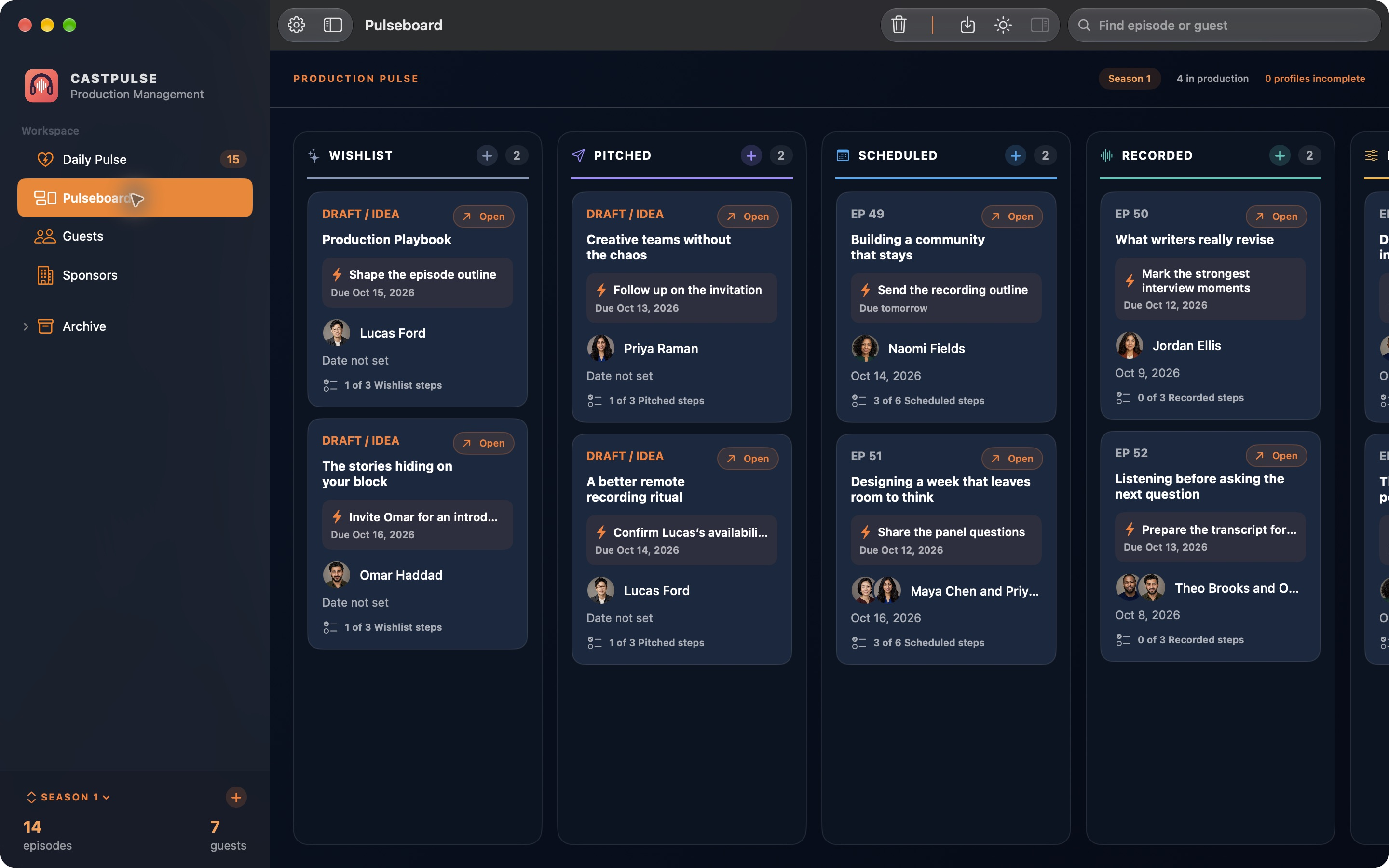
Give every episode a stage and one next action, then work from a list of what’s due instead of from memory. Most episodes go through the same steps: pick the idea, invite the guest, book the recording, record, edit, and publish. CastPulse puts those six stages on one board, called the Pulseboard, gives each stage a checklist, and lists what’s due this week in the Daily Pulse.
From idea to published, stage by stage
Here’s one episode’s trip across the board. Drag a card to the next column, or push it there with a button. Every card carries a single next action, the one thing that moves it forward, and every stage comes with a checklist you can add your own reminders to.
-
01Wishlist
Catch the idea before it’s gone. Add an episode card with a working title and the guest you’d like to have on. Until it’s booked, the card is marked Draft / Idea.
Give it a first next action, like “Shape the episode outline,” and a due date, so the idea doesn’t just sit in a list.
-
02Pitched
Invite the guest, then follow up. The card shows who you asked and the follow-up that’s due, such as “Follow up on the invitation,” so a quiet inbox doesn’t stall the episode.
Log each LinkedIn or email touch on the guest’s profile. You write and send every message yourself, and the Marketing Kit can start the email from a saved template that you edit first.
-
03Scheduled
Book the recording and prepare. Set the recording and publish dates on the episode, and it gets its episode number on the board.
The Scheduled checklist covers the prep: confirm the calendar invitation, prepare the interview outline, send the recording link, and collect the guest’s bio and headshot. Research and interview questions sit in the episode’s Research & Interview section.
-
04Recorded
Record in the app you already use. CastPulse doesn’t record audio. Once the conversation is done, move the episode to Recorded and track what comes next, like marking the strongest moments or preparing the transcript for your editor.
-
05Editing
Edit, review, approve. Your editing happens in your audio tools. The card tracks the next step, like reviewing the second edit or approving the final cut.
Write the show notes while it’s fresh: Markdown with chapters and takeaways, a preview, and Markdown or HTML to paste into your podcast host.
-
06Published
Your host publishes it. CastPulse keeps the launch on track. When the episode is live on your podcast host, move it to Published. CastPulse doesn’t upload or publish audio.
Published has steps too, like sending your guest a launch kit or the newsletter excerpt, so the episode gets shared after it goes out. When you’re done with it, archive the episode to clear it off the board.
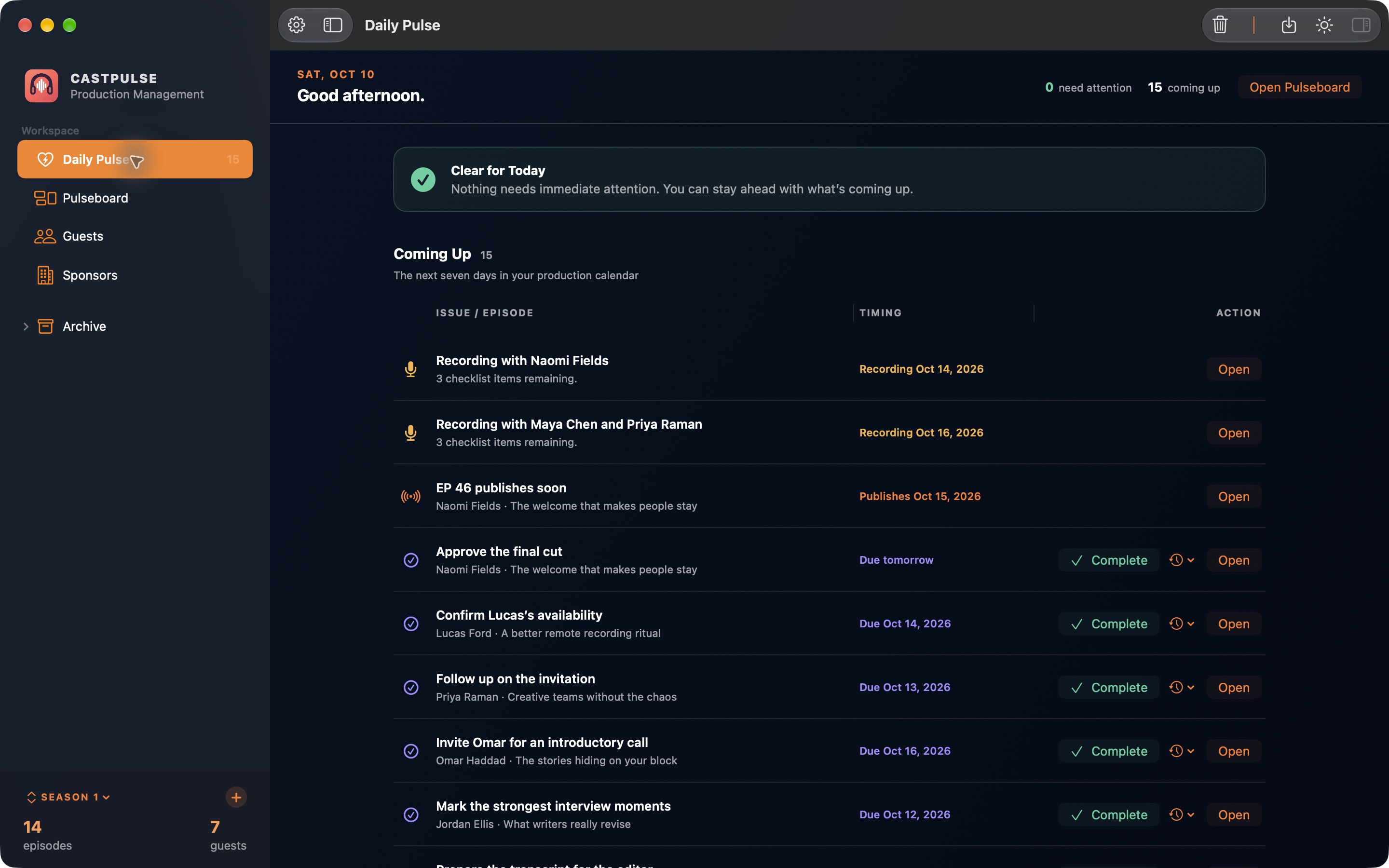
The Daily Pulse: what needs you this week
The board shows where every episode stands. The Daily Pulse shows what to do about it. It collects the next seven days from every episode: recordings with their checklist items still open, publish dates, and every next action that’s due. Complete a task right there, or open the episode. When nothing is overdue, it says you’re clear for today.
Every episode has its own workspace
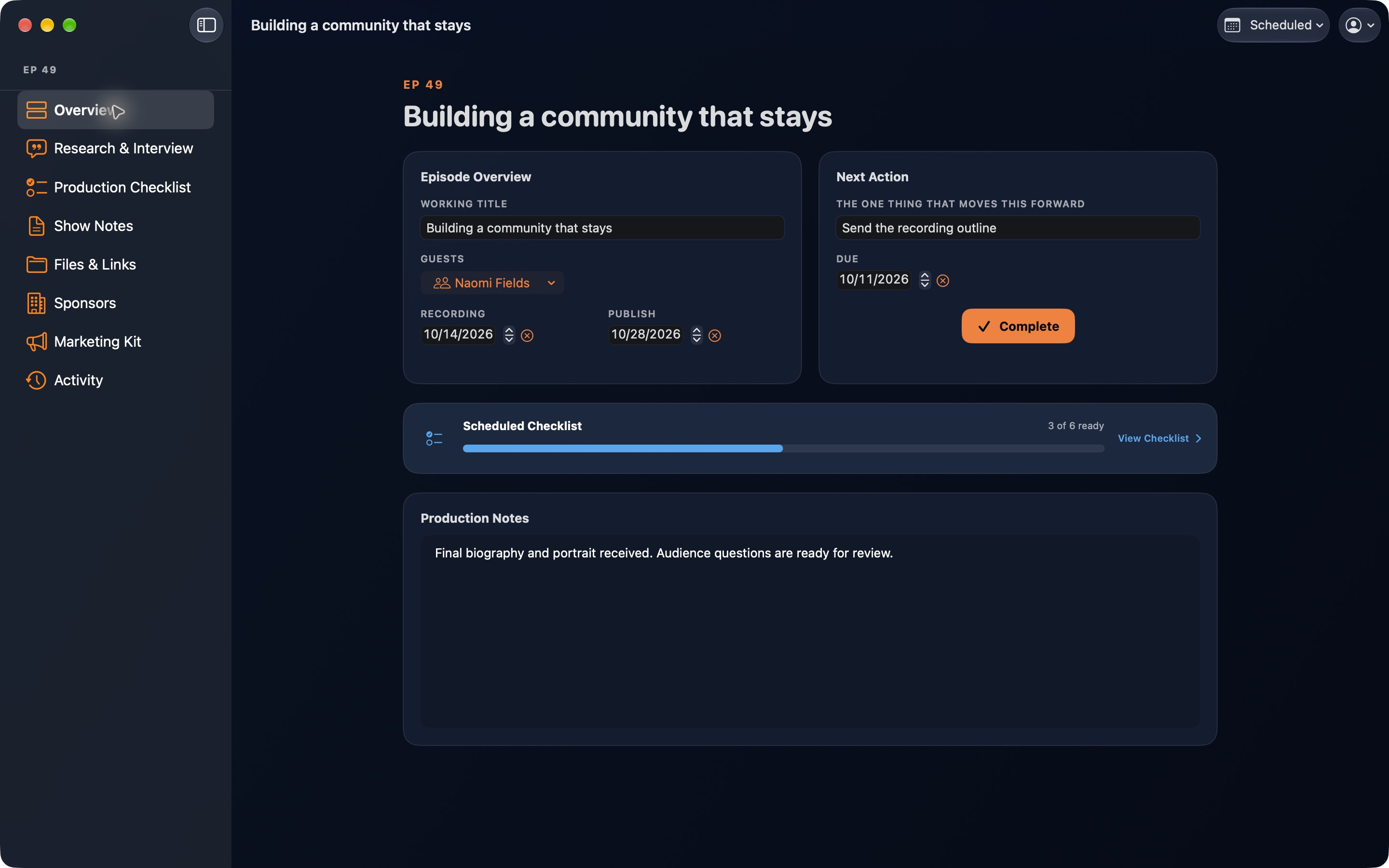
Open any card to get the whole episode in one window: the working title, guests, recording and publish dates, the next action with a Complete button, the current stage’s checklist, and production notes. Alongside them are research and interview questions, show notes, files and links, sponsors, the Marketing Kit, and the episode’s activity.
Planning in a spreadsheet today?
A spreadsheet can hold an episode list, but it can’t tell you what’s due tomorrow, and the guest notes, sponsor reads, and show notes end up in other tabs and other apps. CastPulse keeps them on the episode. Export your production spreadsheet as a CSV file and import it to bring your episodes with you. Planning in Notion instead? See how CastPulse compares.
Questions, answered.
Something else on your mind? Ask on the support page and I’ll reply personally.
What are the production stages in CastPulse?
Six: Wishlist, Pitched, Scheduled, Recorded, Editing, and Published. Each one is a column on the Pulseboard with its own checklist, and you can add your own reminders to any checklist. Drag a card to move it to the next stage, or use the button to push it forward. When you’re done with a published episode, archive it.
Does CastPulse record, edit, or publish episodes?
No. CastPulse plans and tracks the work around the recording. You record and edit in the audio apps you already use, and your podcast host publishes the episode. CastPulse keeps the dates, checklists, guests, sponsors, and show notes.
Can I bring my episode spreadsheet into CastPulse?
Yes. Export your production spreadsheet as a CSV file and import it into CastPulse to bring your episodes with you.
How much does CastPulse cost?
As of November 2026, CastPulse is free to download with a one-month free trial for eligible new subscribers, then $4.99 a month or $39.99 a year. One subscription includes every feature.
Does CastPulse work on iPhone, iPad, or Windows?
No. CastPulse is a Mac app and needs macOS 26 or later. Your production plan stays on your Mac.
Free to download · one-month free trial for eligible new subscribers · then $4.99/month or $39.99/year · macOS 26 or later
Prices as of November 2026. See the rest of CastPulse, or read how it works as a podcast sponsor tracker.